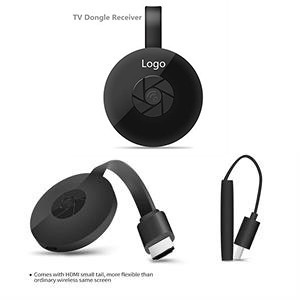
TV Stick TV Dongle Receiver
GO8797
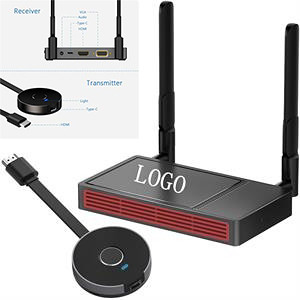
Come and see our amazing products. This is a wireless display receiver that supports the Miracast standard for Android and Windows platforms and DLNA for home multimedia applications. In addition, it is compatible with AirPlay images from Apple's iOS and MAC systems. IOS connection method: Step 1: Press the same screen button to switch to Airplay mode Step 2: On the screen to read the screen with SSID and password (after PSK 8-digit Alibaba) Step 3: Connect the IOS device with the screen SSID using WIFI Step 4: Open Airplay and select MiraScreen SSID to start mirroring Android image method: Step 1: Press the same screen button to switch to Miracast mode Step 2: Turn on the Miracast feature of the Android device (such as Miracast / Smart View, different Miracast feature names will be different) Step 3: Select the same scre Pls confirm further with us if any query about packing info, inventory status and time schedule.
Category: VIDEO EQUIPMENT
Color: White, Black, Gray, Blue, Purple, Red, Orange, Brown,
Material: ABS
Size: 2.28 " x 0.6 "
Price(ccccc)
| Quantity | 100 | 300 | 500 | 1000 |
|---|---|---|---|---|
| Price | 26.64 | 25.68 | 24.7472 | 23.28 |
Imprint Method: Laser/Silkscreen
Imprint Color: Up to 2 colors
Price Includes: Base on 1 color 1 side logo and shipping to CA
Full Color Process: Pls check with us before placing your order
Sold Unimprinted: Yes
| Quantity | 1 |
|---|---|
| Price | 60 |
Production Time: 15-25 Days
Rush Service: Y
Rush Time: 13 Days
Packaging: Case,Poly Bag
Free Shipping: Yes
RELATED PRODUCTS